
Completing an SMC Reset can resolve a variety of issues with your Mac Laptop. Common issues that can be resolved from completing an SMC Reset are, Fans running on high or are very loud, battery run time too short, PowerAdapter light is off/dark when plugged into laptop, wifi icon not available or connecting to known access point. Here is a complete list from Apple
Please follow these steps to creating an SMC Reset with your Mac Laptop
- Shut down your device
- Plug in and connect the Power Adapter
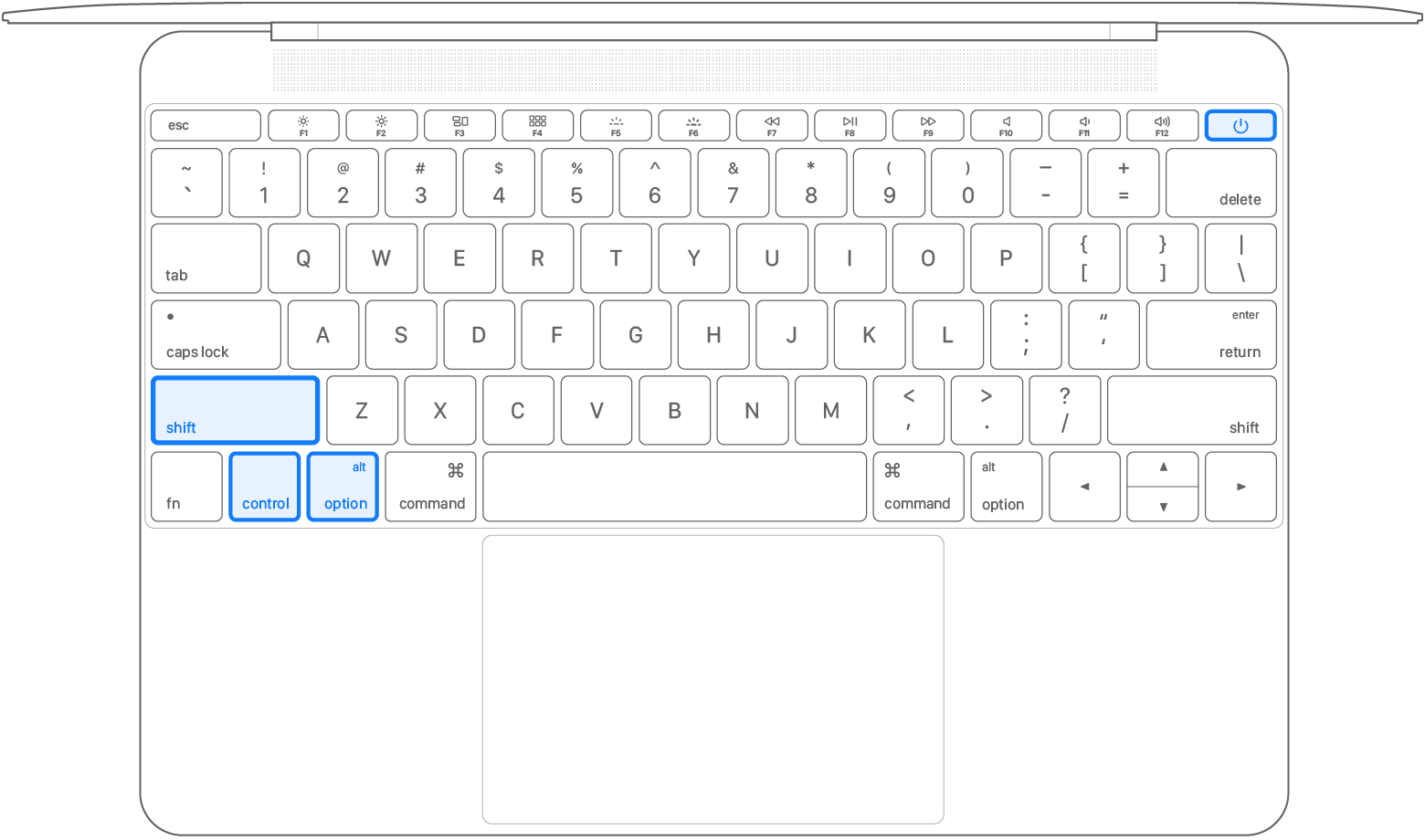
- Press the left-hand SHIFT-CONTROL-OPTION keys and POWER button at the same time.
- Release all keys at the same time after 10 seconds
- Press the POWER button to start your computer.
** Visual indicators that the SMC reset has worked, MagSafe adapter lights will toggle from no light to amber to green and back to amber to indicate the laptop is now charging.
Comments
0 comments
Article is closed for comments.